Software Integration
Overview
The process of “Software Integration” was designed to integrate all subsystems, control and validate the robot’s behavior according to a selected user story. The behavior can be induced by defining conditions in subsystems.
Software integration uses behavior trees to create each behavior and make decisions about the robot’s behavior. The first draft of the project uses py_tree and py_tree_ros, Python implementations of behavior trees, to manage the behaviors of the robot. More information about py_tree can be found at https://py-trees.readthedocs.io/en/devel/.
The developed behavior tree’s structure is divided into three major parts: the root tree, behaviors classes, and subsystem nodes. The root tree was used to create the behavioral flow and call behaviors of the robot. The diagram below (Fig. a) shows the behavior flow of the robot’s first draft. Behaviors classes are used to start subsystem nodes with service and receive status feedback from subsystem nodes. The diagram below (Fig. b) will explain correlation of behavior class and subsystem node.
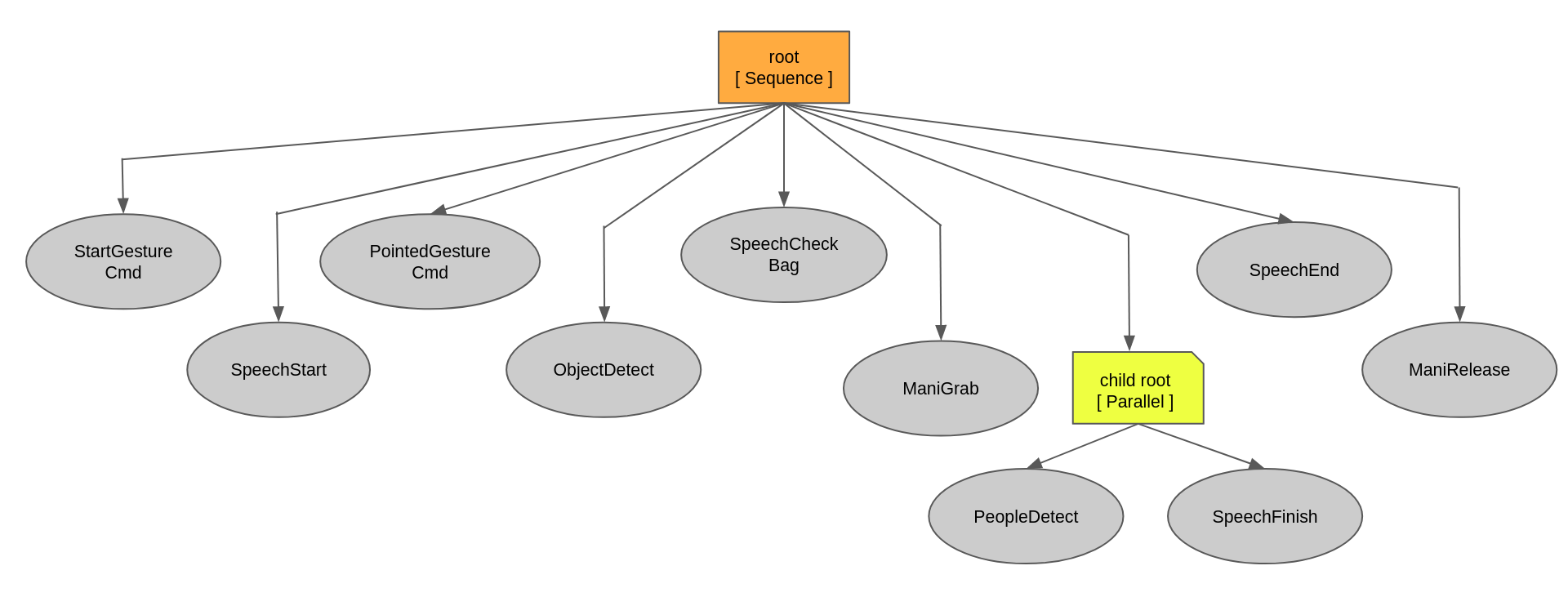
Fig. a shows the behavior flow

Fig. b explain correlation of behavior class and subsystem node
Installation
Install py_tree
sudo apt-get install ros-foxy-py-trees
Install py_tree_ros
sudo apt-get install ros-foxy-py-trees-ros
Test simple behavior tree
Setup
git clone https://github.com/MBSE-2022-1/Software-Team.git
cd sample_ws/
colcon build --symlink-install
Run node
ros2 run sample_integration node.py
Run root node
ros2 run sample_integration root_tree.py
Result
Example
scope of this example for a developed behavior tree is not decided in a failure case
Setup workspace
git clone https://github.com/MBSE-2022-1/Software-Team.git
cd demo_ws/
colcon build --symlink-install
Setup hardware
Camera
ros2 launch realsense2_camera rs_launch.py \
        rgb_camera.profile:=640x480x30 \
        depth_module.profile:=640x480x30 \
        pointcloud.enable:=true
Wheel odometry
sudo chown $USERNAME /dev/ttyACM0
ros2 run xicro_pkg xicro_node_sub_N_pub_ID_3_stm32.py
ros2 run xicro_pkg nav_msg_publisher.py
Run all subsystem node
ros2 launch integrate_system launch_node.launch.py
Run root node
ros2 run integrate_system root.py
Note
You can see all Software Integration’s packages from this github : https://github.com/MBSE-2022-1/Software-Team.git
Subsystem Verification
Software integration testing is separated into four subtasks: start task, check color task, carry luggage task, and follow people task. Each subtask incorporates some behaviors such as
Start task : PointedGestureCmd -> SpeechStart -> PointedGestureCmd
check color task : ObjectDetect -> SpeechCheckBag
carry luggage task : ObjectDetect -> ManiGrab -> ManiRelease
follow people task : PeopleDetectBehavior -> SpeechFinish
This testing is intended to verify the infallible operation of subsystems as well as the correct operation of the root node. When testing, do not test the resource used between the working and quality of each subsystem.
Problem and future plan
Current Issues
Use almost full resources when running all subsystems.
Sending the camera’s data from Intel NUC to Jetson Xavier throws lan cable effect to processing speed of working of subsystems that use the camera’s data.
Future Plan
Manage node initialization and destruction; initialize nodes when they’re needed and destroy nodes when they’re finished.
Develop a behavior tree to decide behavior when there is a failure case.
Increase the behavior that corresponds to the hardware’s behavior.