People Perception
Overview
Package for face recognition and people perception for Cacao mobile robot paticipate in ROBOCUP use with navigation to do people following task
Architecture
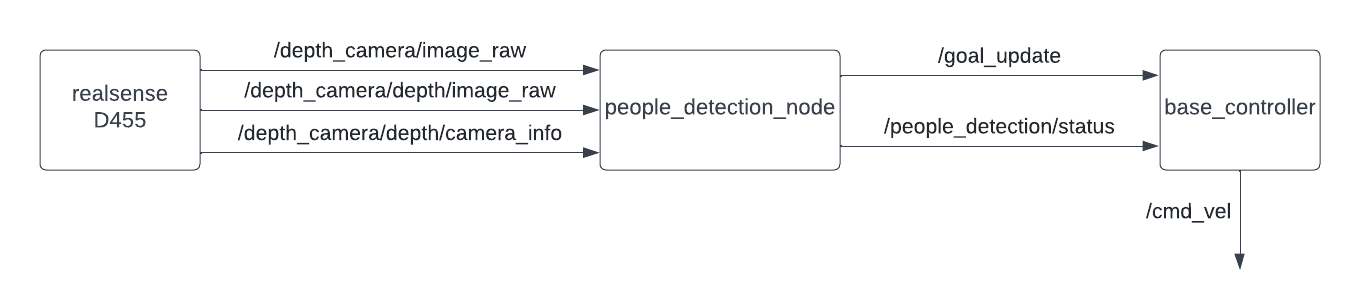
people_detection_scripts.py
Tracking people and send their position to base_controller.py
Topic:

     - /goal_update[geometry_msgs/PoseStamped]

         Publish people position in xy coordinate relative to map to bt naigator for following dynamic object

     - /people_detection/status[std_msgs/Uint8]

         Publish status of the node (0=wait for command,1=running,2=succeed,-1=fail)

 Subscribe:

     - /depth_camera/image_raw[sensor_msgs/Image]

         Subscribe RGB image from D455

     - /depth_camera/depth/image_raw[sensor_msgs/Image]

         Subscribe depth image from D455

     - /depth_camera/depth/camera_info[sensor_msgs/CameraInfo]

         Subscribe camera info from D455

 Service:

     - /people_detection/enable[std_srvs/Empty]

         Call when you want to enable publish tf tranfrom people position to rviz2

     - /people_detection/arrival[std_srvs/Empty]

         Call when you want to tell the robot that you arrive at destination and stop tracking
base_controller.py
Recieve position from people_detection_scripts.py and compute wheel effort to control actuator for people following
Topic:

    - /cmd_vel[geometry_msgs/Twist]

        Publish publist linear velocity and angular velocity of robot to wheel controller node

Subscribe:

    - /goal_update[geometry_msgs/PoseStamped]

        Subscribe tracking position

    - /people_detection/status[std_msgs/Uint8]

        Subscribe status of people follower status(status 1 = follow otherwise stop)
Concept(How does it work?)
def imageCallback(self, data):
cv_image = self.br.imgmsg_to_cv2(data)
self.h, self.w = cv_image.shape[:2]
# To improve performance, optionally mark the image as not writeable to
# pass by reference.
cv_image.flags.writeable = False
cv_image = cv2.cvtColor(cv_image, cv2.COLOR_BGR2RGB)
results = self.pose.process(cv_image)

# Draw the pose annotation on the image.
cv_image.flags.writeable = True
cv_image = cv2.cvtColor(cv_image, cv2.COLOR_RGB2BGR)
self.detect_people = False
# Flip the image horizontally for a selfie-view display.
if results.pose_landmarks!=None:
    mid_x_shoulder = (results.pose_landmarks.landmark[self.lmPose.LEFT_SHOULDER].x +           results.pose_landmarks.landmark[self.lmPose.RIGHT_SHOULDER].x)/2 * self.w
    mid_y_shoulder = (results.pose_landmarks.landmark[self.lmPose.LEFT_SHOULDER].y + results.pose_landmarks.landmark[self.lmPose.RIGHT_SHOULDER].y)/2 * self.h
    mid_x_hip = (results.pose_landmarks.landmark[self.lmPose.LEFT_HIP].x + results.pose_landmarks.landmark[self.lmPose.RIGHT_HIP].x)/2 * self.w
    mid_y_hip = (results.pose_landmarks.landmark[self.lmPose.LEFT_HIP].y + results.pose_landmarks.landmark[self.lmPose.RIGHT_HIP].y)/2 * self.h
    self.point_x = int((mid_x_shoulder + mid_x_hip)/2)
    if self.point_x > self.w-1:
        self.point_x = self.w-1
    elif self.point_x < 0:
        self.point_x = 0
    self.point_y = int((mid_y_shoulder + mid_y_hip)/2)
    if self.point_y > self.h-1:
        self.point_y = self.h-1
    elif self.point_y < 0:
        self.point_y = 0
    cv2.circle(cv_image, (self.point_x,self.point_y), 0, (0,0,255), 20)
    self.detect_people = True
cv2.imshow('MediaPipe Pose', cv2.flip(cv_image, 1))
cv2.waitKey(1)
in imageCallback we use mediapipe to track center of the human body and get 2D coordinate on camera plane.The minimum body part that need to appear in front of cemra is half the body.Then when node recieve enable service it will save 2D coordinate and wait for imageDepthCallback method callback tu publish 3D coordinate relative to base frame of robot
def imageDepthCallback(self, data):
try:
    #get image from msg
    depth_image = self.bridge.imgmsg_to_cv2(data, data.encoding)
    [depth_y, depth_x] = depth_image.shape[:2]
    #mediapipe pose
    # self.get_logger().info(f"{depth_image.shape}")
    if self.intrinsics:
        if self.detect_people and self.follow_enb:
            # self.get_logger().info("publish coordinate")
            x_depth = int(self.point_x * depth_x / self.w)
            y_depth = int(self.point_y * depth_y / self.h)
            depth = depth_image[y_depth, x_depth]
            XYZ = rs2.rs2_deproject_pixel_to_point(self.intrinsics, [x_depth, y_depth], depth)
            t = TransformStamped()
            # Read message content and assign it to
            # corresponding tf variables
            t.header.stamp = self.get_clock().now().to_msg()
            t.header.frame_id = 'camera_link'
            t.child_frame_id = 'user'

            # Turtle only exists in 2D, thus we get x and y translation
            # coordinates from the message and set the z coordinate to 0
            self.x_pos = XYZ[2]/1000.0
            self.y_pos = -XYZ[0]/1000.0
            t.transform.translation.x = XYZ[2]/1000.0 # mm to m
            t.transform.translation.y = -XYZ[0]/1000.0# mm to m
            t.transform.translation.z = 0.0

            # Send the transformation
            self.tf_broadcaster.sendTransform(t)
except CvBridgeError as e:
    print(e)
    return
imageDepthCallback method compute 3D coordinate relative to base frame of robot using pyrealsense2 libraly.It need depth image published by realsense camera
Test environment
Ubuntu 20.04
Ros foxy
Ubuntu kernel 5.11
Installation
ros package
sudo apt-get install ros-foxy-cv-bridge
sudo apt-get install ros-foxy-realsense2-camera
sudo apt-get install ros-foxy-realsense2-camera-msgs
sudo apt-get install ros-foxy-realsense2-description
python package
pip install mediapipe
pip install pyrealsense2
Example
the scope of this example is person tracking
Open terminal in your GUI
In the same terminal run
ros2 launch face_recognitions people_detection.launch.py
It will show camera feed tracking position of the body
Open new terminal, run this command to start people follower
ros2 service call /people_detection/enable std_srvs/srv/Empty
This command must be run when people_detection_scripts.py still tracking person otherwise it will not activate peole follower
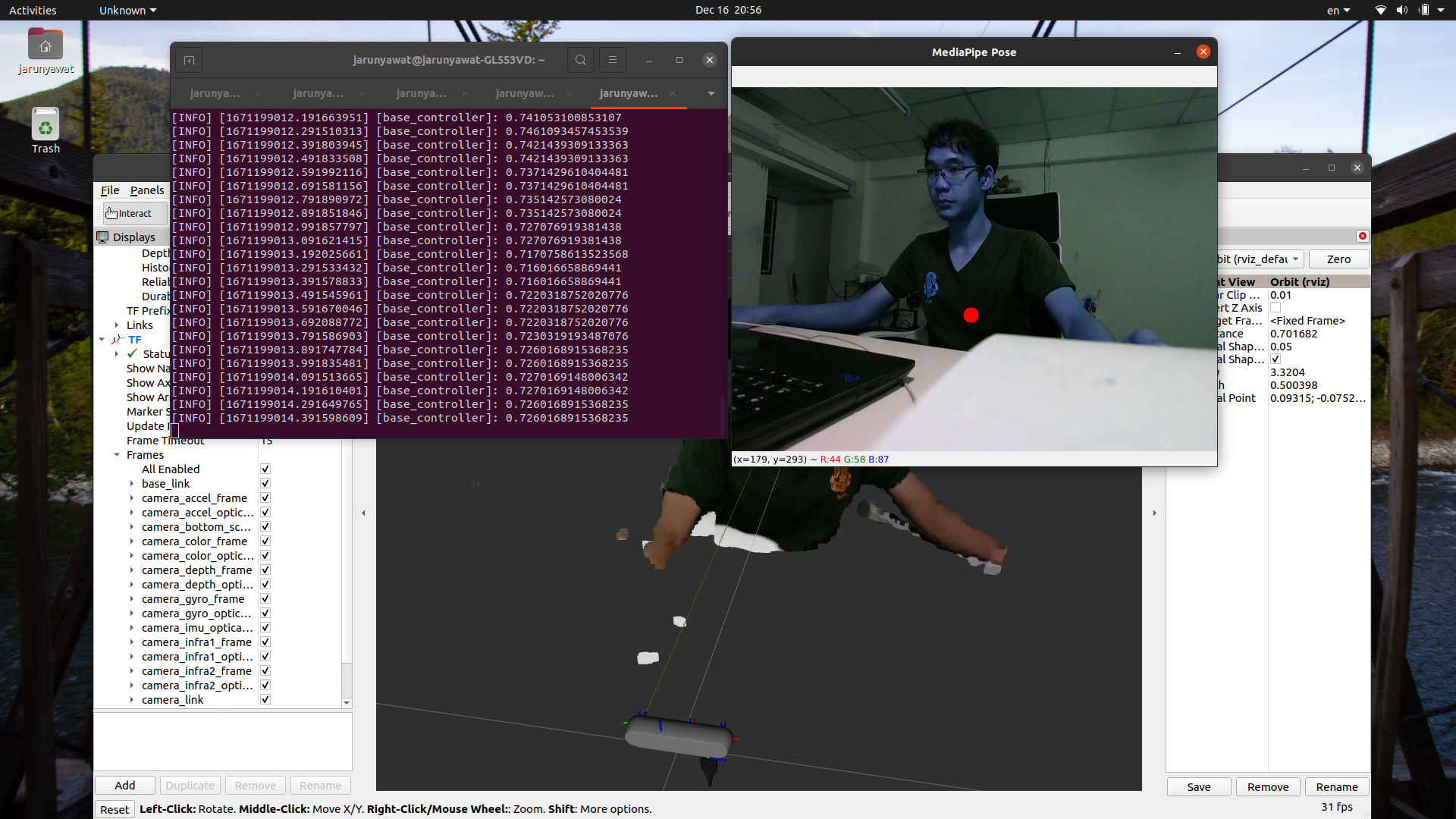
Run this command in new terminal to visualize pointcloud
ros2 launch realsense2_description view_model.launch.py model:=test_d455_camera.urdf.xacro
Add topic by selecting by topic and add depth/color/points/PointCloud2
Now, you should see tf transform attach to tracked person

To end people follower type this command in terminal
ros2 service call /people_detection/arrival std_srvs/srv/Empty
Subsystem Verification
Scope of testing
Test with 2 scenarioes, one person and people in camera
Test initial detection range of people 30, 50, 70, 100 centimetres
Test distant between tracked person and robot when following initiate 1-7 metres
Unit test
Detection range
According to testing,it could track person for maximum range 5 meters away form robot.We suggest that you should keep distant from robot aroud 1 meter to make sure that there will be no stacle pass between you and robot. 2.Speed for following
Tracked person should walk at speed below 0.1 meters per second in front of robot to make sure that robot will eventually catch up.
Problem and future plan
tf listener is too slow for updating robot position and publish person coordinate relative to fixed frame map.We suggest to subscribe /tf topic for robot position because it is robot position relative to odom so we can compute person coordinate relative to fixed frame map