Speech Perception
Overview
Speech perception consists of 2 system Speech recognition and Speech systesis
Speech recognition is a technologies that enable the recognition and translation of spoken language into text by computers with the main benefit of searchability. It is also known as computer speech recognition or speech to text (STT).
Speech systesis is a computer system used for this purpose is called a speech synthesizer, and can be implemented in software or hardware products. A text-to-speech (TTS) system converts normal language text into speech;
Architecture

Speech perception consists of 2 node 1 for process algorithm and 1 for interfacev
It have 4 service server and 5 topic
Service:

     Name : /speech2text_start/status Type: std_srvs.srv/Empty

         It use to enable node to do start task and play sound

     Name : /speech2text_bag/status Type: std_srvs.srv/Empty

         It use to enable node to confirm color of bag

     Name : /speech2text_finish/status Type: std_srvs.srv/Empty

         It use to enable node check when user arrive at the destination

     Name : /speech2text_end/status Type: std_srvs.srv/Empty

     It use to enable node to finish task

 Topic:

     Name : /speech2text_start/status Type: std_msg.msg/Int8

         It publish status of start task

     Name : /speech2text_bag/status Type:std_msg.msg/Int8

         It publish status of bag task

     Name : /speech2text_finish/status Type: std_msg.msg/Int8

         It publish status of finish task

     Name : /speech2text_end/status Type: std_msg.msg/Int8

         It publish status of end task

     Name : /target_color Type: std_msg.msg/string

         It subscription color of bag from object perception
Layout Package
Concept
Node speech process
It will receive command from speechInterface and process it the main function are
callSpeak : It will call speak function to play sound file that already synthesized from gtts if it can not find the file it will use pyttsx3 to synthesis the sound
def callSpeak(self, msg):
#try to find the file in the path and play it
    try:
        playsound(self.path + msg + '.mp3')
    except:
        self.get_logger().info('can not find the file')
        self.engine.say(msg)
        self.engine.runAndWait()
listen : It will listen to microphone and convert it to text by using sphinx and speech recognition and return the text
def listen(self):
    try:
        r = sr.Recognizer()
        with sr.Microphone() as source:
            audio = r.listen(source, timeout = self.timeout, phrase_time_limit = self.phrase_time_limit)
            text = r.recognize_sphinx(audio)
            self.get_logger().info('I hear: %s' % text)
            if(text == ''):
                text = 'Empty string'
            text.lower()
            return text
    except sr.UnknownValueError:
        self.get_logger().info('I can not hear')
        return ''
    except sr.RequestError as e:
        self.get_logger().info('I can not hear')
        return ''
timer callback: It will check if there is command to enable each ability and if there have command it will start to publish data
def timer_callback(self):
    if(self.first_time_finish == True):
        self.first_time_finish = False
        self.isEnable_finish = True
        self.FinishFunction()
    elif(self.first_time_bag == True):
        self.first_time_bag = False
        self.isEnable_bag = True
        self.BagFunction()
    elif(self.first_time_start == True):
        self.first_time_start = False
        self.isEnable_start = True
        self.StartFunction()
    elif(self.first_time_end == True):
        self.first_time_end = False
        self.isEnable_end = True
        self.EndFunction()
Node speechInterface
It will be service server to receive command and adjust parameter of node speechprocess and it will be publisher to send status of each ability
def speech2TextBagCallback(self, request, response):
    self.control.first_time_bag = True
    return response
def publish(self):
    if(self.control.isEnable_bag):
        self.pub_speech2textBag.publish(self.control.param_status_bag)
    ....
    if(self.control.param_status_bag.data != 0):
        self.control.isEnable_bag = False
        self.pub_speech2textBag.publish(self.control.param_status_bag)
        self.control.param_status_bag.data = 0
Installation
playsound
pip install SpeechRecognition
speech recognition
pip install SpeechRecognition
sphinx
pip install pocketsphinx
pyttsx3
pip install pyttsx3
gtts
pip install gtts
pyaudio
pip install pyaudio
Example
clone GitHub repository from
git clone https://github.com/MBSE-2022-1/Software-Team.git -b speech perception
Open terminal and run following command
colcon build
source install/setup.bash
Note
Don’t build with symlink-install
Run command
ros2 run speech speech.py
Open new terminal and run command
ros2 service call /speech2text_start/enable std_srvs/srv/Empty
Subsystem Verification
speech detection with noise environment
testing with use speaker from google translate in english language to say yes and thank you to see accuracy of model speech recongition
Note
noise environment it is a situation that there have a person talk in the same room we adding sound form video people talking
result
Number of testing |
Yes |
Thank you |
|---|---|---|
1 |
mm |
hound |
2 |
error |
channel two |
3 |
oh |
oh |
4 |
hi |
hang on |
5 |
error |
thank you |
6 |
error |
and i |
7 |
oh |
mm |
8 |
yes |
yeah |
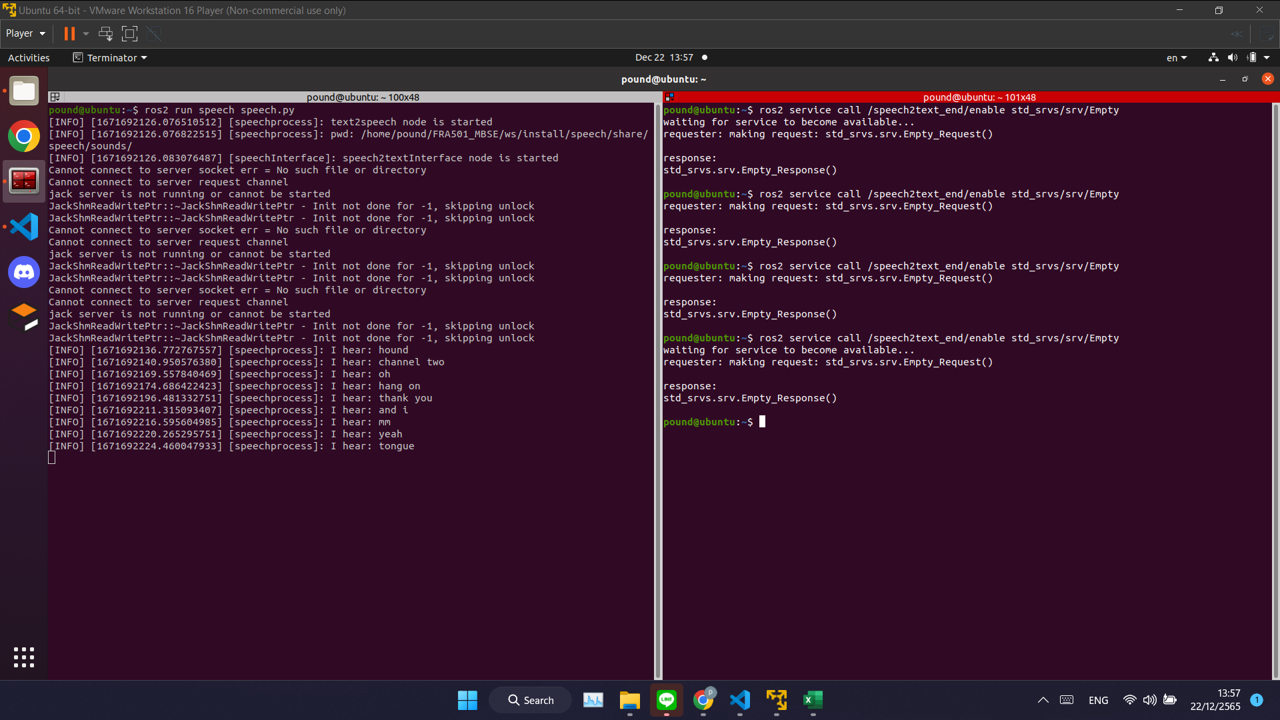
result with “yes” word
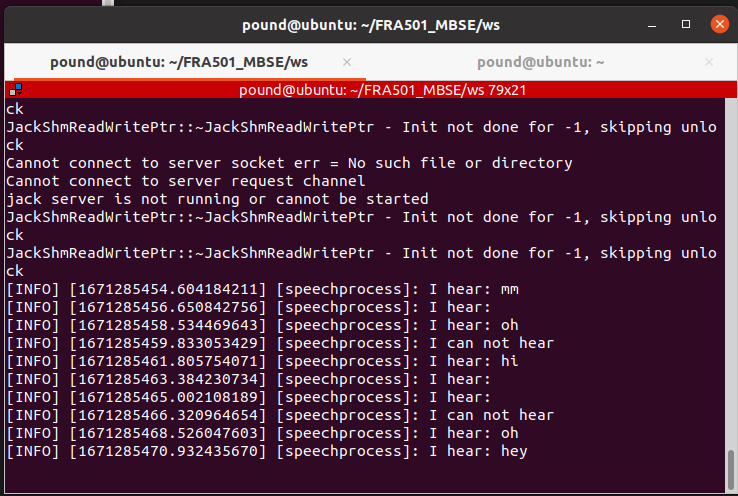
result with “yes” word
word can detection with saying yes,thank you in translate
Problem
model speech recognition have low accuaracy it often go wrong word.
Problem and future plan
Future Plan
training model for speech recognition to improve accuracy and speed of recognition and use machine learning to know what the user want to do